

Codex
OpenAI's official CLI / desktop app. Point it at ByteSeek via a custom provider.
Install
For provider management on desktop, see Codex++.
Prerequisites
- Codex CLI installed (
codex --versionprints a version) - A key supporting the OpenAI format created on the API Keys page
Configure (one click from the console)
No hand-written config needed — the console generates it for your key:
- Open the API keys page, and in the key row's Actions column click More → Use key;
- Switch the dialog to the Codex CLI tab, pick the auth mode and your OS (macOS / Linux or Windows), and copy the two generated files;
- Write them to
~/.codex/config.toml(must sit at the top of the file) and~/.codex/auth.json. Create the directory first withmkdir -p ~/.codexif needed (Windows paths are shown on the dialog's Windows tab).
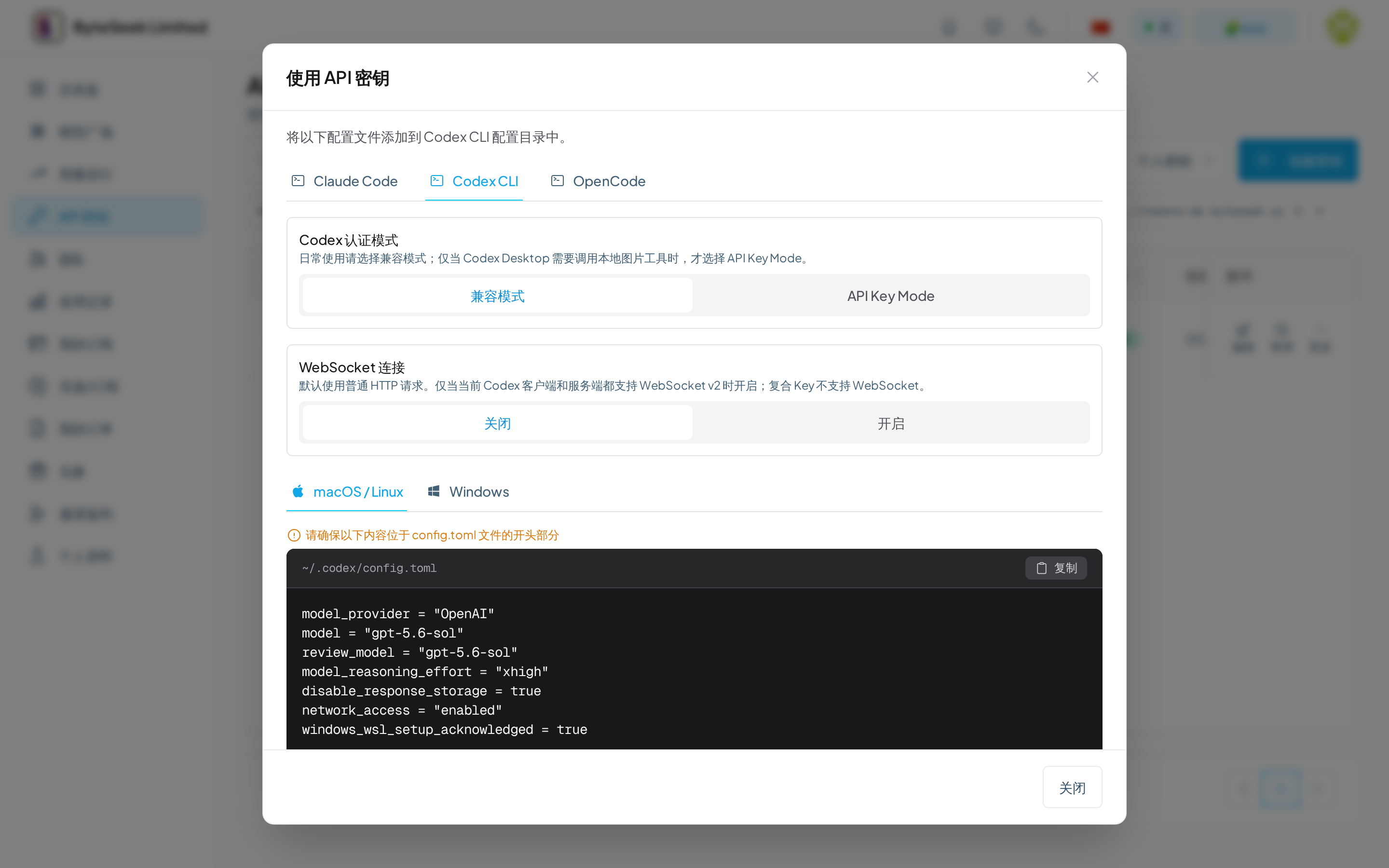
Compatible mode (the everyday default) generates:
~/.codex/auth.json (the key lives here — no environment variable needed):
Swap model / review_model for any model ID from the model plaza; tune model_reasoning_effort as you like.
The two auth modes
After switching to API Key Mode, fully quit and restart Codex Desktop / CLI and start a new task so the client rebuilds its tool registry.
WebSocket
Plain HTTP requests are the default and fine. Only switch the dialog to "On" when both your Codex client and the server support WebSocket v2; composite keys do not support WebSocket.
- On starting
codex, the welcome info shows your configuredmodel(e.g.gpt-5.6-sol) andproviderOpenAI; /statusconfirms the Base URL points attokens.byteseek.aiand auth passes;- Conversations return normally with no 401 / stream errors.
Verify
A normal reply means you are in. The request's model and charge appear on the usage page.
Remote compaction
In the config above the provider's name is OpenAI — not an arbitrary label. It is the switch for Codex's remote compaction.
When a long conversation approaches the context limit, Codex compacts history. Only when the provider's name is exactly OpenAI does Codex prefer the remote compaction endpoint (/v1/responses/compact); remote compaction is higher quality and keeps very long sessions stable without degrading. Any other value (such as ByteSeek) forces local compaction, which is noticeably worse.
- The console-generated config already sets
nametoOpenAI— copy it as is and don't change it; - Changing this setting does not lose existing chat history.
If you also enable the 1M context below, compaction triggers around 900k tokens, where the quality gap of remote compaction matters even more — keep name = "OpenAI".
Enable 1M context
The GPT-5.6 Sol model itself supports a context window of about 1,050,000 tokens, but Codex gives sessions a much smaller budget by default. The configuration below raises the session budget to 1M tokens (method published by Codex engineer Tibo).
Add two lines at the very top of ~/.codex/config.toml — they must sit above every [section] header. TOML assigns keys after a section header to that section, so misplaced keys fail silently:
You can also test once without touching the file:
Verify and mind the cost
- After saving, restart Codex and start a new session, then check the window size with
/status. - Costs rise: upstream bills requests with more than 272k input tokens at a premium (roughly 2× input / 1.5× output). Long context is paid for — everyday tasks rarely need the full window.
With Fast Mode
The Codex desktop app has no priority switch. To route desktop requests through the high-priority lane, set the key's Fast policy to force on — no client changes, see Fast Mode. Cost is roughly 2× regular.